πŸͺ” Happy Diwali! 30% off everything with code DIWALI26
SupportMy downloads
Afojet Currency Converter Pro – Auto Exchange Rates & Multi-Currency Payments for WooCommerce – Sell in your customers' currencies with exch

Afojet Currency Converter Pro – Auto Exchange Rates & Multi-Currency Payments for WooCommerce

by Afojet InfotechWordPress pluginβœ“ Updated 5 Nov 2026v1.0.0

Sell in your customers' currencies with exchange rates that update themselves, payment methods per currency, markup, rounding and fixed prices.

  • Exchange rates that update themselves
  • Payment methods chosen per currency
  • Markup, rounding and fixed prices per currency
Works with
AAfojet Currency Converter for WooCommerce (required)WWooCommerce 7.0+WWordPress 6.0+cclassic checkoutCCart and Checkout blocksHPHPOS

Currency Converter Pro lets your WooCommerce store sell in your customers' currencies, with exchange rates that update themselves. Shoppers see prices in US dollars, pounds, euros, dirhams or any currency you add, and pay in that currency through the payment methods you allow.

Currency Converter Pro is an add-on for the free Afojet Currency Converter for WooCommerce plugin. Install the free plugin first, then upload Pro and enter your licence key.

What Pro adds

  • Automatic exchange rates – from ExchangeRate-API, Frankfurter, Open Exchange Rates or CurrencyAPI, every hour, twice a day or daily. Keep any currency on your own typed rate if you prefer.
  • Backup providers – if the main provider fails or has no rate, the next one is tried, and your last good rates are kept.
  • Payment methods per currency – choose which gateways (PayPal, Stripe, Razorpay, Braintree, Worldpay, 2Checkout, bank transfer, COD…) can take each currency. Blocked methods are hidden at checkout, and checkout is stopped if one is used anyway. PayPal's published currency list is applied automatically.
  • Smart checkout fallback – switch the cart to your checkout currency only when no payment method can take the shopper's currency.
  • Exchange-rate markup – add a percentage per currency to cover conversion fees.
  • Price rounding – whole numbers, nearest 5 or 10, or prices ending in .99 or .95, per currency.
  • Fixed prices per currency – set your own regular and sale price in any currency on simple products and variations.
  • Currency by country – on a shopper's first visit, show the currency of their country if you offer it.
  • One-click updates and licence management from your afojet.com account.

Included in the free plugin

Unlimited currencies with your own exchange rates, a currency switcher (shortcode, widget, floating or on product pages), converted product, variation, shipping and coupon prices, a price filter that follows the selected currency (WooCommerce widget, product filter blocks and TemplateMela/Avanam themes), decimals per currency, checkout in the shopper's or your base currency, and the base currency, rate and base total saved with every order.

What you need

  • WooCommerce 7.0+ and WordPress 6.0+
  • The free Afojet Currency Converter for WooCommerce plugin
  • For automatic rates: nothing for ExchangeRate-API's open endpoint or Frankfurter; a free API key for Open Exchange Rates or CurrencyAPI. Check each provider's terms for commercial use.

Good to know

Supporting a payment gateway does not mean every currency is accepted: your gateway account, country and settlement settings decide that. For example, Razorpay needs International Payments enabled, and Braintree needs a merchant account per currency. Test a real payment in each currency before going live.

Orders are saved in the currency the shopper paid in, and refunds go back in that currency. WooCommerce reports total orders as saved, so mixed-currency orders are not converted in reports.

Pro features keep working after your licence expires; renew to keep getting updates and support.
Features

Why choose Afojet Currency Converter Pro

Automatic rates

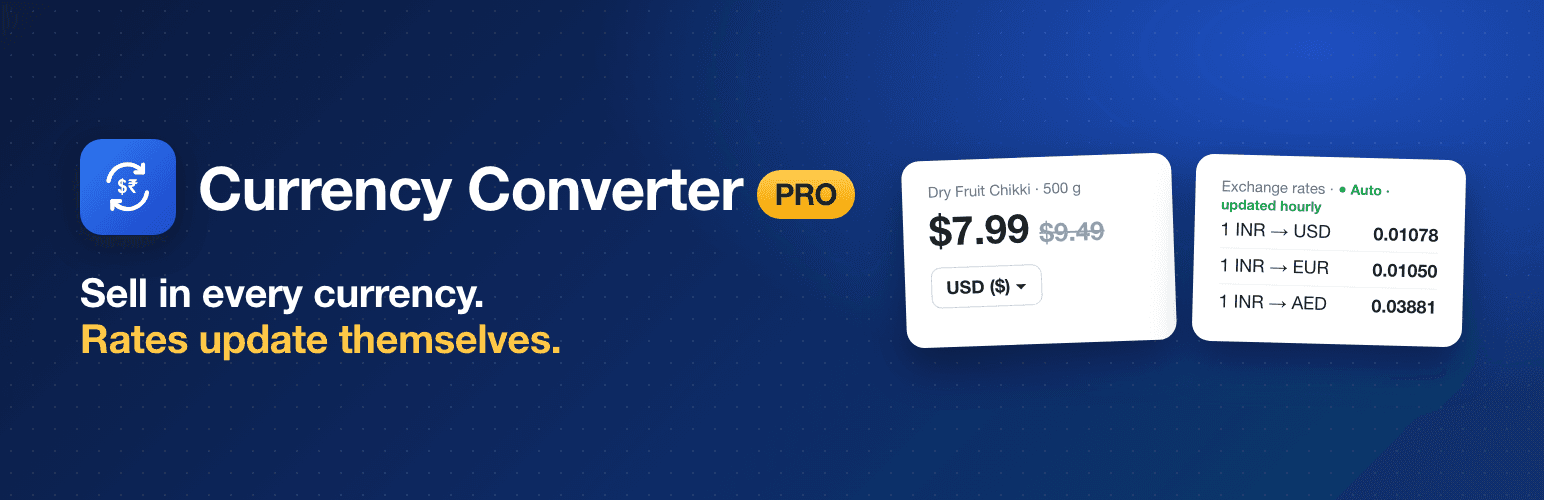
Four providers, updated hourly, twice a day or daily.

Backup providers

The next provider is tried if one fails.

Gateways per currency

Allow or block each payment method for each currency.

Smart checkout

Switch currency only when no payment method fits.

Markup

Add a percentage per currency to cover conversion fees.

Price rounding

.99, .95, whole numbers or nearest 5/10.

Fixed prices

Your own price per currency on any product.

Currency by country

First-time visitors see their own currency.

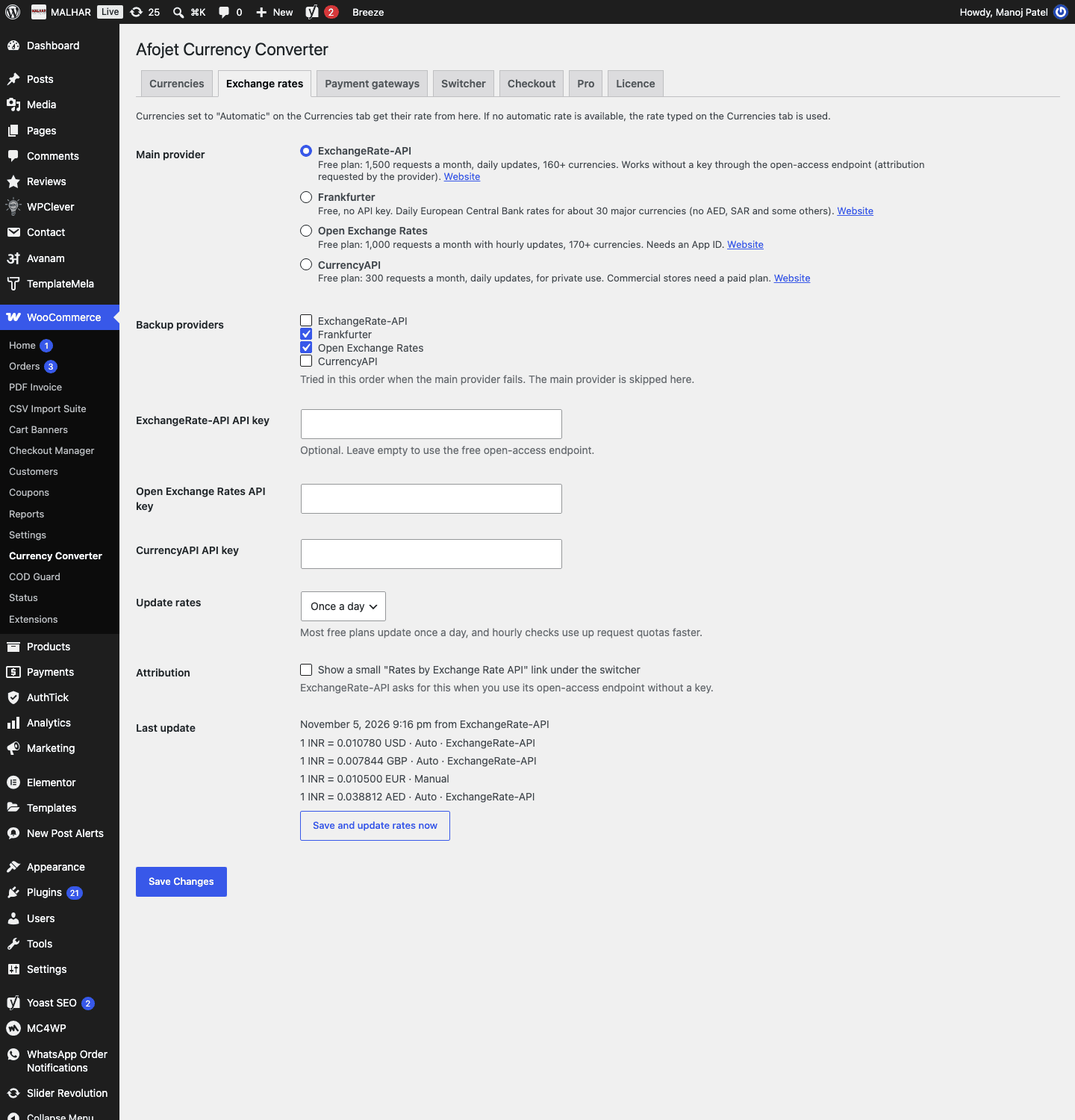
Automatic exchange rates

Rates come from ExchangeRate-API, Frankfurter, Open Exchange Rates or CurrencyAPI and refresh on your schedule.

  • Hourly, twice a day or daily
  • Backup providers when one fails
  • Keep any currency on your own rate
Automatic exchange rates from four providers, with backup providers and hourly or daily updates

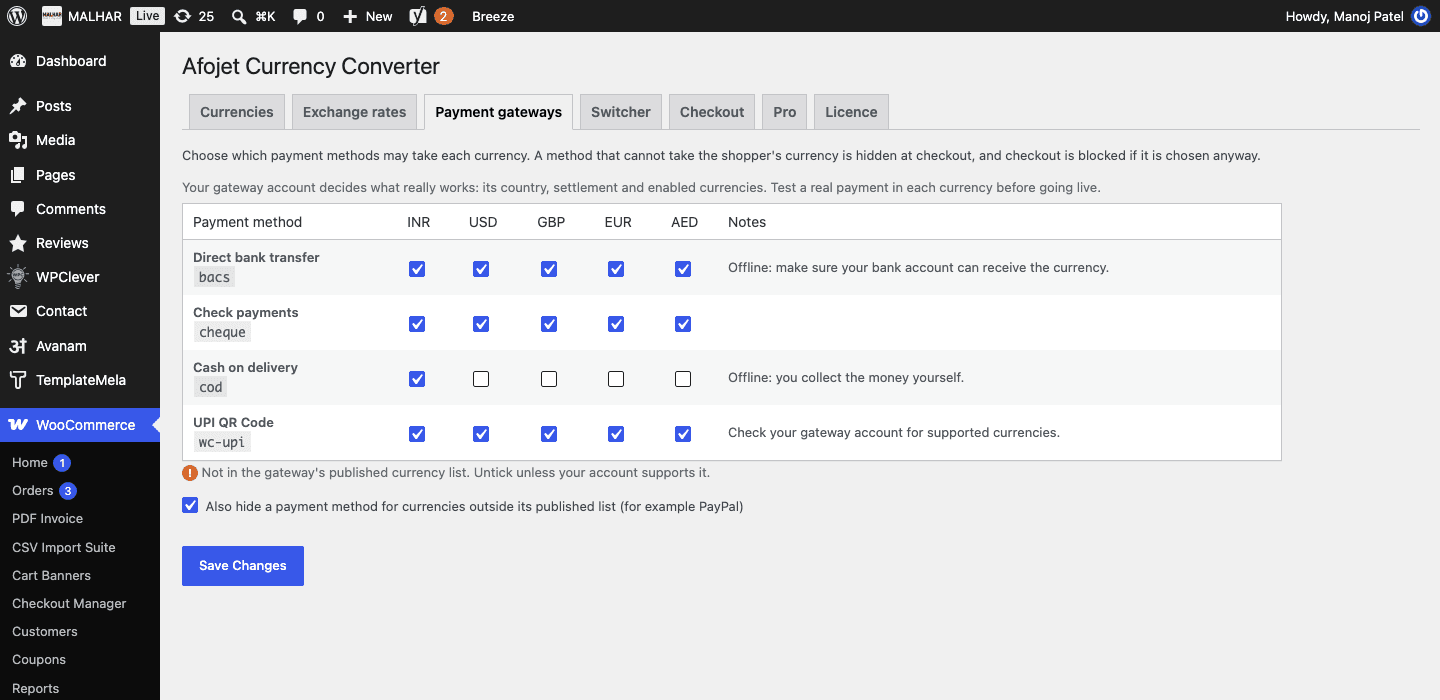
Payment methods per currency

Choose which gateways can take each currency, so shoppers only see methods that will work.

  • PayPal, Stripe, Razorpay, Braintree, Worldpay, 2Checkout and more
  • PayPal's currency list applied automatically
  • Checkout stopped if a blocked method is used
Choose which payment methods can take each currency

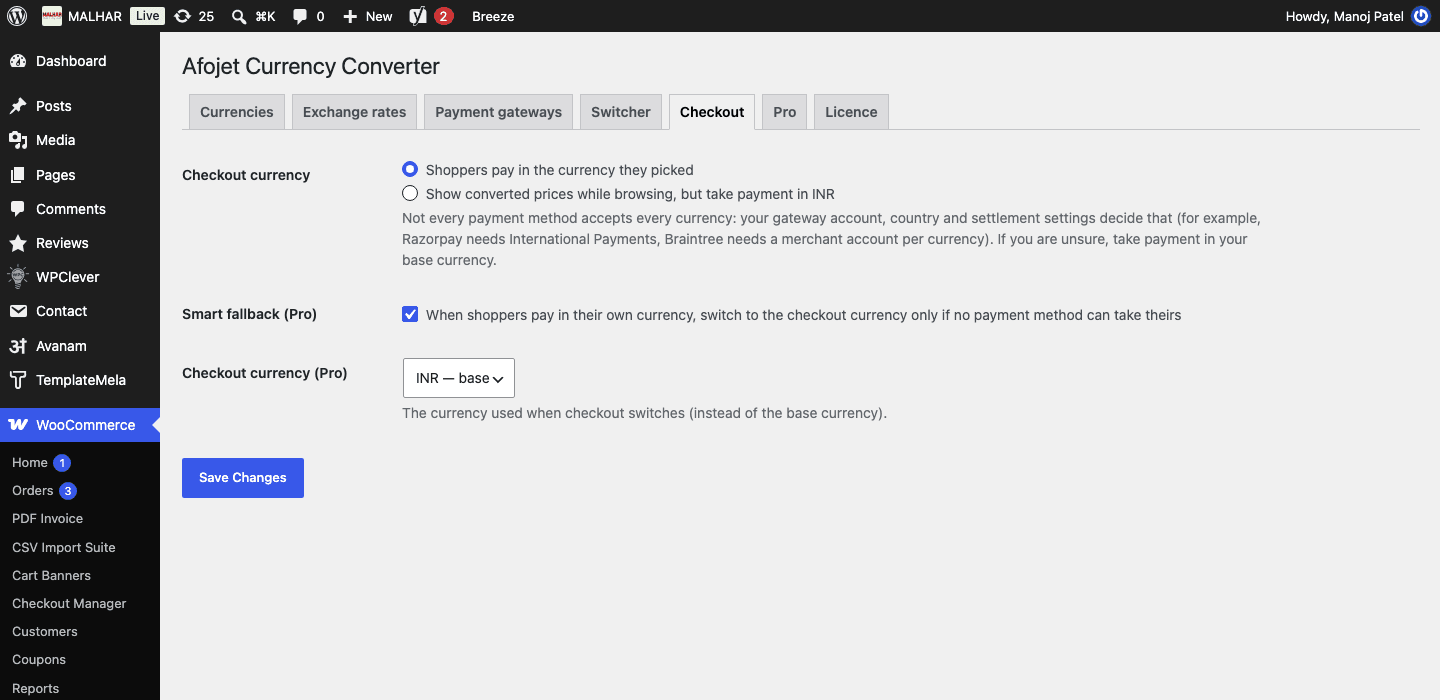
Smart checkout currency

Switch the cart to your checkout currency only when no payment method can take the shopper's currency.

  • Choose the checkout currency
  • Clear notice to the shopper
  • Works with the Checkout block
Checkout currency: pay in the shopper's currency, in your base currency, or switch only when no payment method can take it

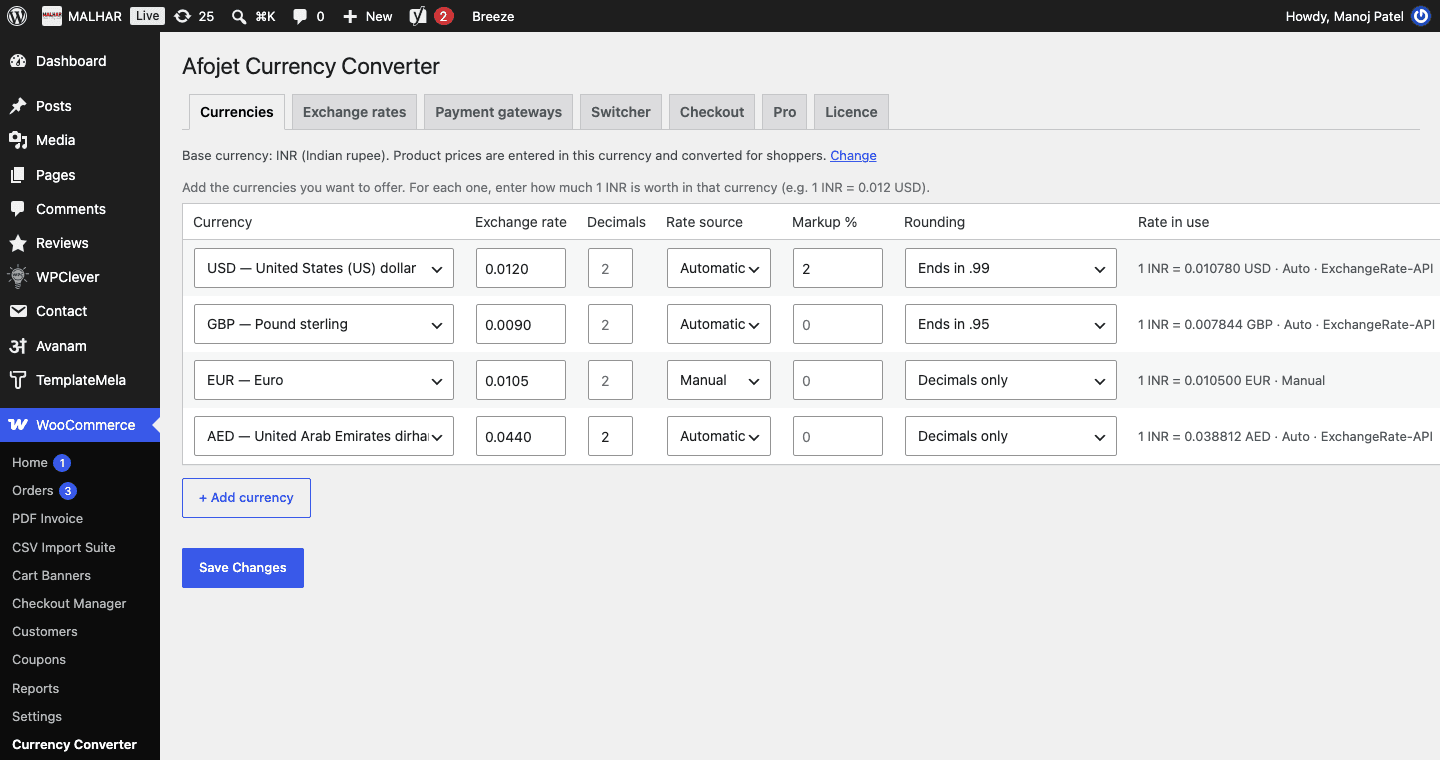
Markup, rounding and fixed prices

Set prices that look right in every currency.

  • Markup % per currency
  • Round to whole numbers, nearest 5/10, .99 or .95
  • Fixed regular and sale prices per currency
Currencies: automatic or manual rate, markup and price rounding (.99, .95, nearest 5/10) per currency

Prices in the shopper's currency

Products, shipping, coupons and the price filter follow the selected currency, and first-time visitors see their country's currency.

  • Currency by visitor country
  • Switcher on every page
  • Price filter converted
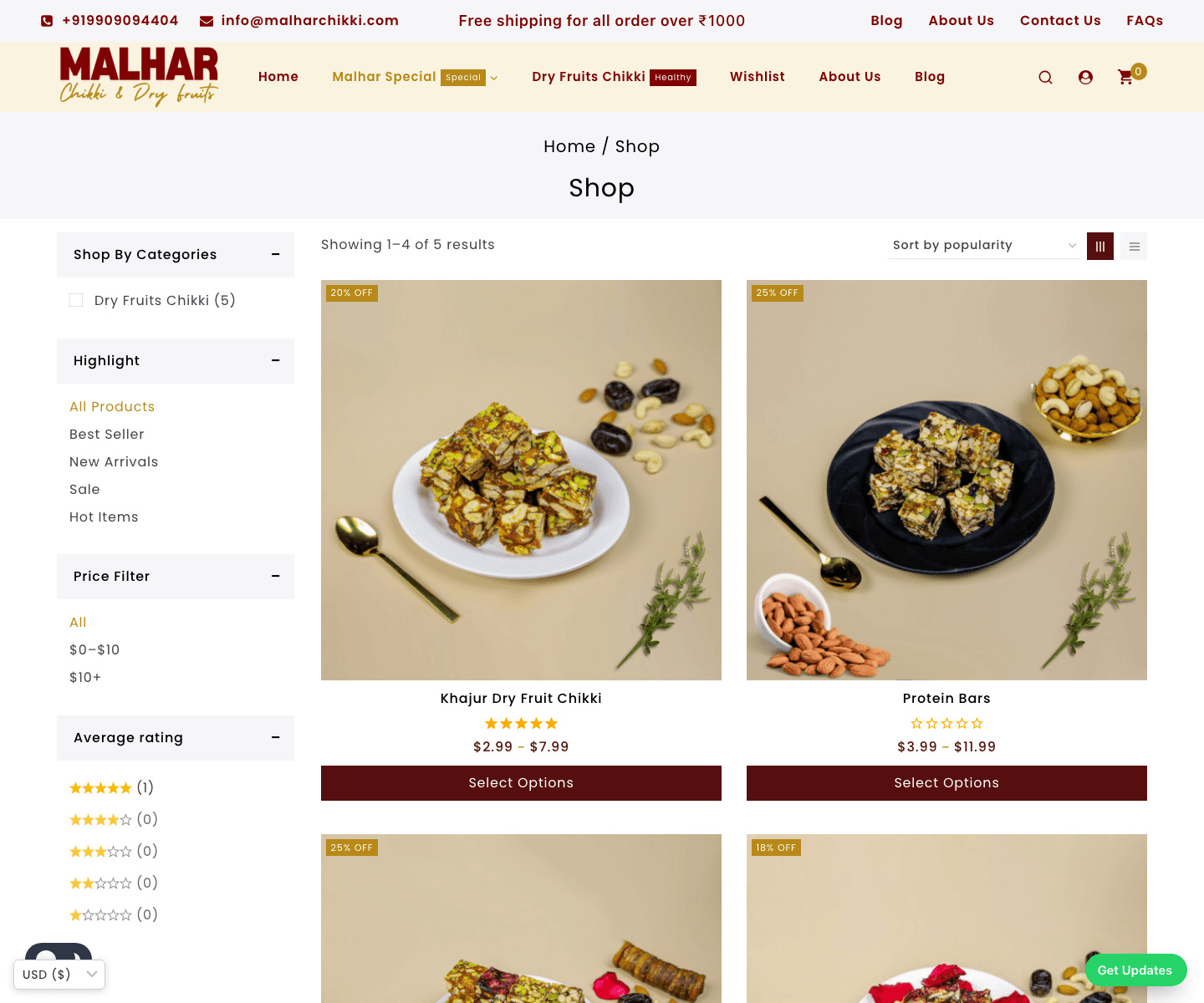
Shop prices in the shopper's currency, with the currency switcher and a price filter that follows the selected currency

How Afojet Currency Converter Pro works

  1. 1

    Install both plugins

    Install the free Afojet Currency Converter for WooCommerce, then upload Currency Converter Pro.

  2. 2

    Activate your licence

    Paste your afojet.com licence key under WooCommerce β†’ Currency Converter β†’ Licence.

  3. 3

    Turn on automatic rates

    Pick a provider and backups on the Exchange rates tab, then set your currencies to Automatic.

  4. 4

    Match payments to currencies

    On the Payment gateways tab, untick currencies each gateway cannot take, and choose your checkout fallback.

Screenshots

See every screen

Click a picture to see it full size.

Pricing

One payment. No monthly fees.

1 Site

1 website
β‚Ή1,999
for 1 site
  • All Pro features
  • 1 website
  • Updates for 1 year
  • Support for 1 year
Best value

5 Sites

5 websites
β‚Ή3,499
for 5 sites
  • All Pro features
  • 5 websites
  • Updates for 1 year
  • Support for 1 year

25 Sites

25 websites
β‚Ή5,999
for 25 sites
  • All Pro features
  • 25 websites
  • Updates for 1 year
  • Priority support for 1 year
  • Instant download after payment
  • Licence key emailed to you
  • Secure payment

7-day money-back guarantee

Not happy with your purchase? Contact us within 7 days of buying and we'll refund you in full.

Reviews

What buyers say

β€”
No reviews yet
5 β˜…0
4 β˜…0
3 β˜…0
2 β˜…0
1 β˜…0
Only verified buyers can review. Log in if you bought it.
FAQ

Questions before you buy

Do I need the free plugin?

Yes. Pro is an add-on. Install the free Afojet Currency Converter for WooCommerce first, then upload Pro and enter your licence key under WooCommerce β†’ Currency Converter β†’ Licence.

Which exchange-rate provider should I use?

ExchangeRate-API works without a key and covers 160+ currencies, so it is the default. Frankfurter is free but has about 30 currencies (no AED). Open Exchange Rates and CurrencyAPI need a free API key; check their terms for commercial use.

Will PayPal, Razorpay or Stripe accept every currency?

Not always. Your gateway account decides that: Razorpay needs International Payments, Braintree needs a merchant account per currency. Untick unsupported currencies on the Payment gateways tab and test a real payment in each currency.

Does it work with the Checkout block?

Yes, and with the classic checkout.

Which currency are orders and refunds in?

Orders are saved in the currency the shopper paid in, with the base currency, rate and base total. Refunds go back in the order's currency.

What happens when my licence expires?

All Pro features keep working. Renew to keep getting new versions and support.

Changelog

What’s new

Version 1.0.0

Latest

1.0.0

  • First release.
  • Automatic exchange rates from ExchangeRate-API, Frankfurter, Open Exchange Rates and CurrencyAPI, with backup providers.
  • Payment methods per currency, with PayPal's currency list applied automatically.
  • Smart checkout currency fallback.
  • Exchange-rate markup and price rounding per currency.
  • Fixed product prices per currency.
  • Currency by visitor country.
  • afojet.com licensing and one-click updates.

Ready to get Afojet Currency Converter Pro?

Instant download Β· updates and support from the developers

Buy now