How to Reduce Fake COD Orders in WooCommerce with Free OTP Verification
On this page
Introduction: Is Your WooCommerce Store Losing Money on Fake COD Orders?
Cash on Delivery (COD) remains a popular payment method for online shoppers, especially in India. Many customers prefer paying when their products arrive rather than making an online payment in advance.
For WooCommerce store owners, however, COD can create challenges.
Customers may enter incorrect mobile numbers, place accidental orders, or submit orders without a genuine intention to receive the package. When these orders are shipped but not accepted, businesses can lose money on shipping charges, packaging, logistics, and returned inventory.
One practical way to address this problem is to verify the customer's mobile number before accepting a COD order.
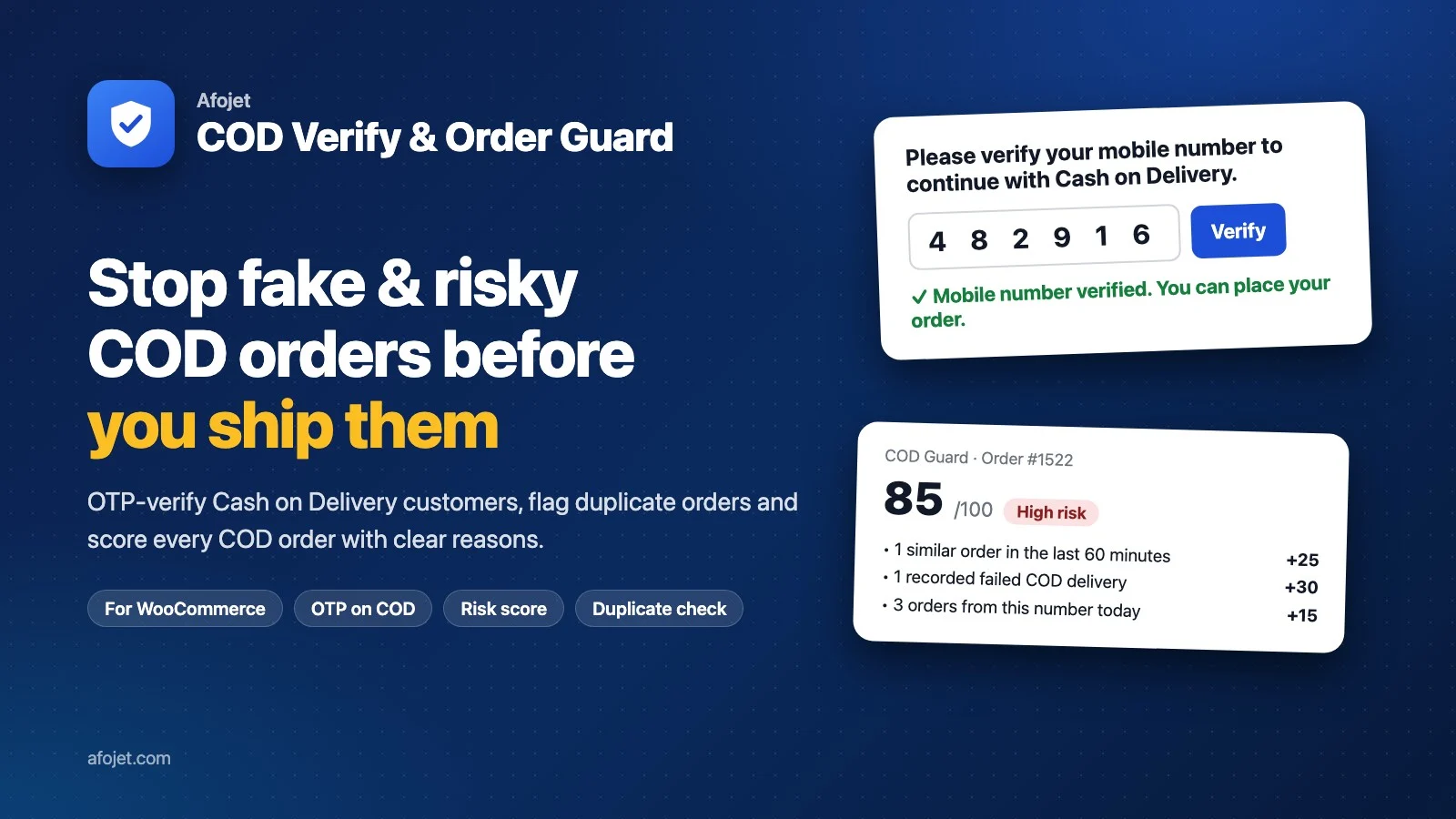
Introducing Afojet COD Verify & Order Guard, a free WooCommerce plugin that allows customers to confirm their phone numbers through a one-time password (OTP) before placing Cash on Delivery orders.
Instead of relying entirely on the information entered at checkout, you can add an extra verification step to your ordering process.
The best part? The plugin is free, and you can connect it to your existing SMS gateway.
What Is Afojet COD Verify & Order Guard?
Afojet COD Verify & Order Guard is a WooCommerce plugin designed to help online store owners verify customer phone numbers for Cash on Delivery orders.
When a customer selects COD at checkout, the plugin requests an OTP sent to the customer's mobile number. The customer must enter the correct code to complete the verification process.
Prepaid orders are not subjected to this COD verification requirement.
The plugin also provides order-level verification information, allowing store administrators to identify which COD orders have been verified and which may require additional attention.
Whether you operate a clothing store, an electronics shop, a beauty products website, or a general online store, phone verification can add an extra layer of protection to your checkout process.
Explore the plugin: https://www.afojet.com/product/afojet-cod-verify-order-guard
Why Do WooCommerce Stores Need COD Verification?
COD offers convenience to customers, but it can introduce operational risks for online retailers.
1. Incorrect Mobile Numbers
Customers sometimes enter incorrect or unreachable phone numbers during checkout. This can make it difficult for delivery partners to contact them.
OTP verification helps confirm that the customer has access to the phone number provided at checkout.
2. Fake or Non-Serious Orders
Some orders are placed accidentally, while others may be submitted without a genuine intention to complete the purchase.
Requiring an OTP adds an extra step that can discourage some low-intent orders.
3. Return-to-Origin (RTO) Costs
When a COD shipment cannot be delivered or is refused, it may be returned to the seller. This is commonly called Return to Origin (RTO).
Businesses may incur forward shipping charges, return shipping costs, packaging expenses, and additional handling work.
Phone verification can help address one source of delivery problems, although it cannot prevent every failed delivery or RTO.
4. Time Spent Following Up on Orders
Store owners and support teams may spend valuable time contacting customers to confirm whether they actually placed an order.
Verifying phone-number access during checkout can provide useful information before the order moves into fulfillment.
Key Features of Afojet COD Verify & Order Guard
The plugin combines phone verification with practical controls for WooCommerce order management.
1. OTP Verification for Every COD Order
Require customers to verify their mobile numbers when choosing Cash on Delivery.
The verification process helps confirm that the person placing the order has access to the supplied phone number.
Key benefits:
- Adds phone verification to the COD checkout process.
- Helps identify incorrect or inaccessible phone numbers.
- Supports both guest customers and logged-in users.
- Requires verification again if the customer changes their phone number.
- Leaves prepaid orders unaffected.
This provides an additional checkpoint before a COD order is accepted.
2. Works with Your Existing SMS Gateway
You do not need to switch to a specific SMS provider just to use the plugin.
Afojet COD Verify & Order Guard supports SMS gateways that offer an HTTP API, including many Indian transactional SMS providers.
The integration supports configurable request methods and parameters, including:
- GET requests.
- Form POST requests.
- JSON requests.
- Placeholders for the recipient's phone number, OTP, and message.
- Sandbox mode for testing the integration.
You can configure your SMS provider and test the connection before making the verification process available to customers.
Important: The plugin is free, but SMS delivery is not necessarily free. Your SMS provider may charge you for messages. Indian businesses must also ensure that their SMS templates and messaging setup comply with applicable DLT requirements.
3. Secure OTP Handling
OTP verification should be designed to prevent repeated guessing and unnecessary message requests.
The plugin includes security measures such as:
- Random verification codes.
- Hashed OTP storage.
- OTP expiration.
- Resend waiting periods.
- Limits on incorrect verification attempts.
- Rate limits per phone number and visitor.
These controls help protect the verification process against abuse.
4. Compatible with Classic Checkout and Checkout Block
WooCommerce stores use different checkout experiences depending on their themes and configuration.
Afojet COD Verify & Order Guard supports both:
- Classic WooCommerce checkout.
- WooCommerce Checkout block.
It supports guest checkout and logged-in customers, helping store owners add phone verification without restricting the feature to registered users.
For Checkout block installations, ensure that the phone field is enabled and required.
5. Verification Status in WooCommerce Orders
Once customers start placing orders, administrators need a convenient way to identify their verification status.
The plugin displays verification information in the WooCommerce orders list and on individual order screens.
Available statuses include:
- Verified: The phone number passed OTP verification.
- Pending: Verification is still pending.
- Not required: Verification was not required for that order.
- Admin override: An administrator manually overrode the verification status.
Administrators can also approve an order or mark a phone number as verified, with a reason recorded in the audit log.
This makes it easier to review orders and understand how their verification status was determined.
6. Protection Against Duplicate Checkout Submissions
Customers sometimes click the Place Order button multiple times because a page appears slow or unresponsive.
The plugin includes protection against submitting the same cart repeatedly within a short period.
This can help reduce accidental duplicate submissions during checkout.
7. Choose What Happens When an OTP Cannot Be Sent
SMS delivery can occasionally fail because of provider issues, network problems, or incorrect configuration.
The plugin allows store owners to choose how COD orders should be handled when an OTP cannot be sent.
Depending on the configuration, you can:
- Hide the COD payment option.
- Accept an unverified COD order and hold it for review.
An order is not marked as verified unless the correct OTP has been entered.
This gives store owners greater control over how they balance checkout convenience and order verification.
8. Privacy-Conscious Data Handling
Customer phone numbers and verification records should be handled carefully.
The plugin uses keyed hashes for phone numbers in its own tables and removes logs after a configured retention period.
It also supports WooCommerce High-Performance Order Storage (HPOS).
As with any customer-data processing solution, store owners should review their privacy policy, data-retention practices, and applicable legal obligations.
How Does COD OTP Verification Work?
The process is straightforward.
Step 1: Customer Adds Products to the Cart
A customer browses your WooCommerce store, selects products, and proceeds to checkout.
Step 2: Customer Selects Cash on Delivery
The customer chooses COD as the preferred payment method.
Step 3: OTP Verification Begins
The plugin requests a one-time verification code through your configured SMS gateway.
Step 4: Customer Enters the OTP
The customer enters the code received on their mobile phone.
Step 5: Verification Is Completed
If the code is correct and valid, the customer can proceed with the COD order.
Step 6: The Store Records Verification Status
The verification status is available to the store administrator in WooCommerce order management.
The result is a more structured checkout process in which phone-number verification takes place before the order is accepted.
How to Set Up Afojet COD Verify & Order Guard
Getting started involves a few basic steps.
Step 1: Install the Plugin
Visit the official product page and obtain the free plugin download.
Upload the plugin ZIP file through your WordPress dashboard under Plugins → Add New → Upload Plugin, then install and activate it.
Step 2: Configure Your SMS Gateway
Open the plugin's provider settings under WooCommerce → COD Guard → Providers.
Enter your SMS gateway URL and the required parameters for sending verification messages.
Use the available placeholders to pass the customer's phone number, OTP, and message content.
Step 3: Test the SMS Connection
Use the connection-testing feature to confirm that your SMS gateway can send verification messages.
Check the provider's response and verify that the OTP arrives on the intended mobile number.
Step 4: Configure COD Verification
Choose your preferred verification behavior and configure how the store should respond if a verification message cannot be sent.
Step 5: Test the Customer Checkout
Place a test COD order and confirm that the OTP verification process works as expected.
Also test a prepaid order to ensure it does not unnecessarily trigger COD verification.
Step 6: Monitor Order Verification Status
After launching the feature, check verification statuses in the WooCommerce orders list and review any unverified orders before fulfillment.
For the latest installation instructions and configuration details, refer to the official product page.
Who Should Use This Plugin?
Afojet COD Verify & Order Guard can be useful for many types of WooCommerce stores.
Fashion and Clothing Stores
Clothing stores often handle multiple sizes, colors, and product variations. Verifying phone-number access can provide an additional checkpoint before shipping COD orders.
Electronics Stores
Electronics products may involve higher order values and shipping expenses. Phone verification helps confirm access to the supplied number before an order proceeds.
Beauty and Personal Care Stores
Stores selling skincare, cosmetics, and personal care products can add an extra verification step to their COD checkout.
Home and Lifestyle Stores
Businesses selling home accessories, kitchen products, décor, and lifestyle items can use phone verification to improve their order-handling process.
Small Businesses and Growing Online Stores
Smaller businesses may not have dedicated teams to manually contact every COD customer. Automated OTP verification can help establish a consistent checkout procedure without requiring a paid plugin licence.
Free Plugin vs. Pro Version: Which Should You Choose?
Afojet offers a free version and a separate Pro version for businesses that need additional COD risk-management tools.
| Feature | Free Version | Pro Version |
|---|---|---|
| SMS OTP verification for COD | Yes | Yes |
| SMS gateway integration | Yes | Yes |
| Classic checkout and Checkout block support | Yes | Yes |
| Verification status in WooCommerce orders | Yes | Yes |
| Basic OTP security controls | Yes | Yes |
| COD risk score with reasons | No | Yes |
| Duplicate-order detection | No | Yes |
| Rules based on order value | No | Yes |
| Rules based on PIN code, category, and delivery history | No | Yes |
| WhatsApp OTP through Afojet AuthTick | No | Yes |
| Additional review workflow and dashboard | No | Yes |
Choose the free version if your primary requirement is to verify phone numbers before accepting COD orders.
Consider the Pro version if you need more advanced risk scoring, configurable COD restrictions, duplicate-order detection, and additional order-review tools.
You can explore both options on the official Afojet website.
Important: Does OTP Verification Eliminate Fake Orders?
No verification system can eliminate every fake order or guarantee successful delivery.
OTP verification confirms that the customer has access to the phone number used during checkout. It does not prove the customer's identity, guarantee that the delivery address is correct, or ensure that the customer will accept the parcel.
For stronger COD risk management, businesses can combine OTP verification with order-value rules, duplicate-order checks, delivery-history analysis, address validation, and manual review of suspicious orders.
The free version provides a useful first layer of protection, while the Pro version adds further risk-management capabilities.
Frequently Asked Questions
Is Afojet COD Verify & Order Guard free?
Yes. The free version is available without a plugin licence fee. However, your SMS provider may charge you for sending OTP messages.
Does it verify prepaid orders?
No. The plugin's OTP verification requirement applies to COD orders. Prepaid orders are not asked to complete this COD-specific verification.
Which SMS gateways are supported?
The plugin supports SMS providers that offer an HTTP API. Compatibility depends on the provider's API requirements and configuration.
Does it work with WooCommerce Checkout block?
Yes. The plugin supports both classic checkout and Checkout block. For the Checkout block, keep the phone field enabled and required.
Can I use it for guest checkout?
Yes. It supports both guest customers and logged-in customers.
Does it prevent all fake COD orders?
No. It helps verify phone-number access and adds a layer of protection, but it cannot guarantee that every customer is genuine or that every order will be delivered successfully.
What happens if the OTP cannot be sent?
You can configure the store to hide COD or accept an unverified order and hold it for review.
Is an SMS gateway account required?
Yes, for sending real OTP messages. The plugin also includes a sandbox mode for testing.
What additional features does the Pro version offer?
The Pro version adds risk scoring, duplicate-order detection, configurable COD rules, WhatsApp verification through Afojet AuthTick, a review workflow, and a dashboard.
Final Thoughts: Add an Extra Layer of Protection to Your COD Checkout
Cash on Delivery can help WooCommerce businesses serve customers who prefer paying upon delivery. However, unverified phone numbers and non-serious orders can create unnecessary work and shipping expenses.
Afojet COD Verify & Order Guard offers a practical starting point by introducing SMS OTP verification before COD orders are accepted.
With support for existing SMS gateways, modern WooCommerce checkout experiences, secure OTP controls, and order-level verification information, the plugin helps businesses establish a more reliable COD ordering process.
If you want to add phone verification to your WooCommerce store without paying for a plugin licence, start with the free version.
Ready to verify your COD orders?
Get started with Afojet COD Verify & Order Guard today.
Download the free plugin: https://www.afojet.com/product/afojet-cod-verify-order-guard
Need advanced COD protection? Explore the Pro version for additional risk scoring and order-management features.
Keep reading
View all → Hosting
VPS Server Reboot Issue: Root Cause & Permanent Fix
Unexpected server reboots and websites becoming inaccessible are among the most frustrating problems for VPS users. Many VPS environments experience random downtime, Apache freezes, or sudden performance issues without clear error messages.
How license keys work for our plugins
Activate, move and renew your license keys in a few clicks.
 WooCommerce
How to Add OTP Login in WooCommerce (Step-by-Step Guide)
Secure your WooCommerce store with OTP login. Step-by-step guide to add WhatsApp OTP for safe, seamless logins.
Comments
No comments yet. Be the first!
Leave a comment